See every renewal before it charges you.
Netflix, Meralco, your phone plan and the trial you forgot to cancel, each on the day it’s due.
Download free
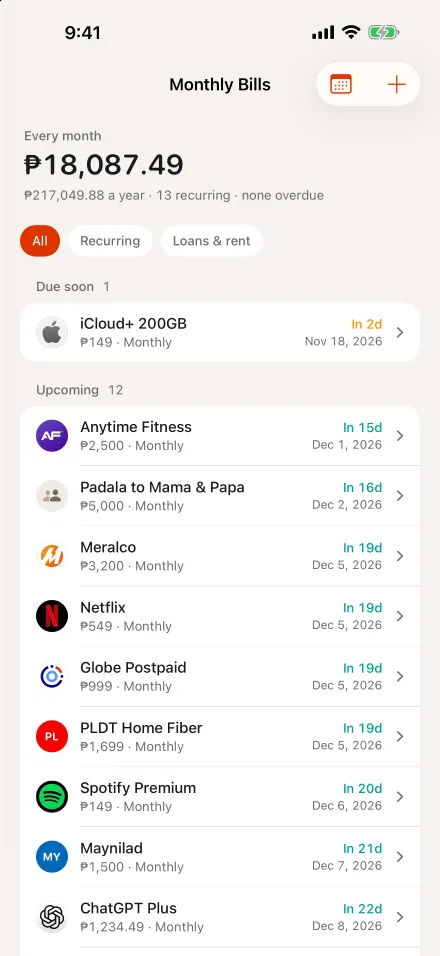
LAYA's demo account
Small charges add up quietly
Six subscriptions in LAYA’s demo account. None of them feels big on its own.
From LAYA’s demo account
How it works
Add a bill
1Add them your way
Type a bill in a few taps, or share a screenshot of your App Store subscriptions or a card statement. Reading screenshots needs Apple Intelligence and iOS 27.
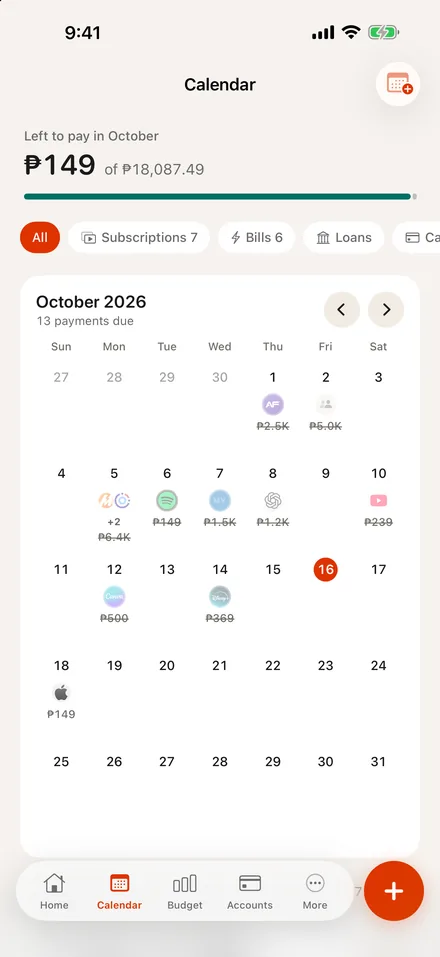
2See them on the Calendar
Subscriptions, bills, loans and card statements on the day each is due, with what’s left to pay this month.
Set aside before payday
3Plan to payday
See what’s left after planned spending, so the money for bills is set aside first.
Bills next to the rest of your money
A reminder app tells you a bill is due. LAYA also shows what’s left after you pay it.
Recorded on the due date
Recurring bills can record themselves on their due date, or you can turn that off for any bill.
Charges that keep coming back
Trends and category breakdowns show which charges repeat every month.
No bank login
You add bills yourself, from a screenshot, or by sharing a bank alert into LAYA.
Guides
FAQ
No. LAYA shows what renews and when, so you can cancel in the app or site that bills you before the charge goes through.
No. LAYA doesn’t connect to Philippine banks, GCash or Maya, and it doesn’t read your messages in the background. You add bills yourself, from a screenshot, or by sharing a bank alert into LAYA.
Yes, on devices with Apple Intelligence running iOS 27. Share a screenshot of your App Store subscriptions or a card statement, and Juls reads it into bills for you to review.
LAYA is free to download. The free plan includes 10 accounts, 5 budgets and 5 goals, and Pro is an optional in-app purchase.
No more surprise renewals.
Free to download on iPhone, iPad and Mac.
Download freeLAYA also covers barkada trips and utang, in the same app.